1. 摘要
用 TRAE SOLO 快速开发了一个纯前端、可直接本地运行的 Markdown 在线预览编辑器,实现左侧编辑、右侧实时渲染、一键复制 HTML 与导出文件功能,零配置开箱即用,完整复现主流 Markdown 编辑器核心体验。
2. 背景
我是一名前端开发,日常常写技术文档与接口说明,需要一个轻量、无依赖、可本地直接打开的 Markdown 编辑器。传统方案要么依赖 Node 环境、要么需安装插件,想用 SOLO 实现纯 HTML+JS+CSS、双击即可运行的独立 Demo,提升文档编写效率。
实践过程
(1)任务拆解
-
需求梳理:双栏布局、Markdown 解析、实时渲染、工具栏、复制 HTML、导出.md 文件
-
技术选型:纯 HTML + 原生 JS+CSS(不引入框架,保证本地直接运行)
-
界面设计:左侧编辑区、右侧预览区、顶部工具栏
-
功能开发:解析器引入、事件绑定、样式美化、导出逻辑
(2)用到的 SOLO 能力
-
SOLO Coder:全流程代码生成、架构规划、语法纠错
-
需求理解:自然语言转开发清单,自动拆分模块
-
代码优化:兼容处理、样式美化、注释完善
-
调试修复:一键解决渲染异常、导出失效等问题
(3)关键 Prompt
开发一个纯前端Markdown在线编辑器,要求:
1. 双栏布局:左侧编辑区(textarea)、右侧实时预览区
2. 支持基础Markdown语法:标题、加粗、斜体、列表、链接、代码块、引用
3. 顶部工具栏:快捷插入语法按钮
4. 功能:实时渲染、复制HTML、导出.md文件
5. 纯HTML+JS+CSS,不依赖任何框架,本地双击即可运行
6. 界面简洁现代,响应式布局,适配移动端
(4)操作步骤
-
打开 TRAE SOLO → 输入上述 Prompt
-
SOLO 自动生成完整项目结构与代码(index.html)
-
预览运行:SOLO 内置浏览器一键启动,验证渲染效果
-
优化迭代:补充代码块高亮、修复列表嵌套 Bug、调整样式
-
导出文件:保存为本地 HTML,完成可运行 Demo
(5)踩坑与解决
-
问题 1:Markdown 解析不完整,代码块、表格不渲染
解决:让 SOLO 替换为更完善的
marked.js解析逻辑,补充语法规则 -
问题 2:导出文件中文乱码
解决:SOLO 添加
charset="utf-8"与 Blob 编码配置 -
问题 3:移动端布局错乱
解决:SOLO 自动生成响应式 CSS,适配小屏设备
4. 成果展示
核心文件:markdown-editor
Markdown 在线编辑器 * { margin: 0; padding: 0; box-sizing: border-box; } body {
font-family: -apple-system, BlinkMacSystemFont, 'Segoe UI', Roboto, 'Helvetica Neue', Arial, sans-serif;
background: #1e1e1e;
color: #d4d4d4;
height: 100vh;
display: flex;
flex-direction: column;
overflow: hidden;
}
.header {
background: #252526;
padding: 12px 20px;
border-bottom: 1px solid #3c3c3c;
display: flex;
justify-content: space-between;
align-items: center;
}
.header h1 {
font-size: 18px;
font-weight: 500;
color: #e0e0e0;
}
.toolbar {
display: flex;
gap: 8px;
}
.toolbar button {
background: #3c3c3c;
border: 1px solid #5c5c5c;
color: #e0e0e0;
padding: 6px 12px;
border-radius: 4px;
cursor: pointer;
font-size: 13px;
transition: all 0.2s;
}
.toolbar button:hover {
background: #4c4c4c;
border-color: #6c6c6c;
}
.container {
display: flex;
flex: 1;
overflow: hidden;
}
.editor-section {
flex: 1;
display: flex;
flex-direction: column;
border-right: 1px solid #3c3c3c;
}
.section-header {
background: #2d2d2d;
padding: 8px 16px;
font-size: 12px;
color: #888;
border-bottom: 1px solid #3c3c3c;
text-transform: uppercase;
letter-spacing: 0.5px;
}
.editor-section:last-child {
border-right: none;
}
#editor {
flex: 1;
background: #1e1e1e;
color: #d4d4d4;
border: none;
resize: none;
padding: 20px;
font-family: 'Consolas', 'Monaco', 'Courier New', monospace;
font-size: 14px;
line-height: 1.6;
outline: none;
overflow-y: auto;
}
#editor::placeholder {
color: #666;
}
#preview {
flex: 1;
background: #1e1e1e;
padding: 20px;
overflow-y: auto;
line-height: 1.6;
}
#preview h1, #preview h2, #preview h3, #preview h4, #preview h5, #preview h6 {
margin-top: 24px;
margin-bottom: 16px;
font-weight: 600;
line-height: 1.25;
color: #e0e0e0;
}
#preview h1 {
font-size: 2em;
border-bottom: 1px solid #3c3c3c;
padding-bottom: 8px;
}
#preview h2 {
font-size: 1.5em;
border-bottom: 1px solid #3c3c3c;
padding-bottom: 6px;
}
#preview h3 {
font-size: 1.25em;
}
#preview p {
margin-bottom: 16px;
}
#preview code {
background: #2d2d2d;
padding: 2px 6px;
border-radius: 3px;
font-family: 'Consolas', 'Monaco', 'Courier New', monospace;
font-size: 0.9em;
}
#preview pre {
background: #2d2d2d;
padding: 16px;
border-radius: 6px;
overflow-x: auto;
margin-bottom: 16px;
}
#preview pre code {
background: none;
padding: 0;
}
#preview blockquote {
border-left: 4px solid #4a90e2;
padding-left: 16px;
margin: 16px 0;
color: #999;
}
#preview ul, #preview ol {
margin-bottom: 16px;
padding-left: 2em;
}
#preview li {
margin-bottom: 4px;
}
#preview a {
color: #4a90e2;
text-decoration: none;
}
#preview a:hover {
text-decoration: underline;
}
#preview table {
border-collapse: collapse;
width: 100%;
margin-bottom: 16px;
}
#preview th, #preview td {
border: 1px solid #3c3c3c;
padding: 8px 12px;
text-align: left;
}
#preview th {
background: #2d2d2d;
font-weight: 600;
}
#preview img {
max-width: 100%;
height: auto;
border-radius: 4px;
}
#preview hr {
border: none;
border-top: 1px solid #3c3c3c;
margin: 24px 0;
}
/* 滚动条样式 */
::-webkit-scrollbar {
width: 10px;
height: 10px;
}
::-webkit-scrollbar-track {
background: #1e1e1e;
}
::-webkit-scrollbar-thumb {
background: #4a4a4a;
border-radius: 5px;
}
::-webkit-scrollbar-thumb:hover {
background: #5a5a5a;
}
/* 响应式设计 */
@media (max-width: 768px) {
.container {
flex-direction: column;
}
.editor-section {
border-right: none;
border-bottom: 1px solid #3c3c3c;
}
.toolbar {
flex-wrap: wrap;
}
.toolbar button {
padding: 4px 8px;
font-size: 12px;
}
}
</style>
Markdown 在线编辑器
<div class="container">
    <div class="editor-section">
        <div class="section-header">编辑器</div>
        <textarea id="editor" placeholder="在这里输入 Markdown 内容..."></textarea>
    </div>
    <div class="editor-section">
        <div class="section-header">预览</div>
        <div id="preview"></div>
    </div>
</div>

<script>
    const editor = document.getElementById('editor');
    const preview = document.getElementById('preview');

    // 配置 marked.js
    marked.setOptions({
        highlight: function(code, lang) {
            if (lang && hljs.getLanguage(lang)) {
                return hljs.highlight(code, { language: lang }).value;
            }
            return hljs.highlightAuto(code).value;
        },
        breaks: true,
        gfm: true
    });

    // 更新预览
    function updatePreview() {
        const markdown = editor.value;
        preview.innerHTML = marked.parse(markdown);
    }

    // 插入 Markdown 语法
    function insertMarkdown(before, after) {
        const start = editor.selectionStart;
        const end = editor.selectionEnd;
        const text = editor.value;
        const selectedText = text.substring(start, end);

        editor.value = text.substring(0, start) + before + selectedText + after + text.substring(end);
        editor.focus();
        editor.selectionStart = start + before.length;
        editor.selectionEnd = start + before.length + selectedText.length;
        updatePreview();
    }

    // 清空编辑器
    function clearEditor() {
        if (confirm('确定要清空编辑器吗?')) {
            editor.value = '';
            updatePreview();
        }
    }

    // 同步滚动
    let isScrolling = false;

    editor.addEventListener('scroll', function() {
        if (!isScrolling) {
            isScrolling = true;
            const scrollPercentage = editor.scrollTop / (editor.scrollHeight - editor.clientHeight);
            preview.scrollTop = scrollPercentage * (preview.scrollHeight - preview.clientHeight);
            setTimeout(() => { isScrolling = false; }, 50);
        }
    });

    preview.addEventListener('scroll', function() {
        if (!isScrolling) {
            isScrolling = true;
            const scrollPercentage = preview.scrollTop / (preview.scrollHeight - preview.clientHeight);
            editor.scrollTop = scrollPercentage * (editor.scrollHeight - editor.clientHeight);
            setTimeout(() => { isScrolling = false; }, 50);
        }
    });

    // 监听输入变化
    editor.addEventListener('input', updatePreview);

    // 初始化示例内容
    const defaultContent = `# 欢迎使用 Markdown 在线编辑器
这是一个简单易用的 Markdown 编辑器,支持实时预览。
功能特性
- 实时预览:编辑内容即时显示在预览区
- 代码高亮:支持多种编程语言的语法高亮
- 同步滚动:编辑区和预览区同步滚动
- 工具栏:快速插入常用 Markdown 语法
示例代码
```javascript
function hello() {
console.log(“Hello, World!”);
}
```
表格示例
| 名称 | 类型 | 描述 |
|---|---|---|
| 编辑器 | 文本 | Markdown 输入区 |
| 预览 | HTML | 渲染后的预览区 |
引用示例
这是一个引用块
可以包含多行内容
开始编辑你的 Markdown 文档吧!
`;
    editor.value = defaultContent;
    updatePreview();
</script>
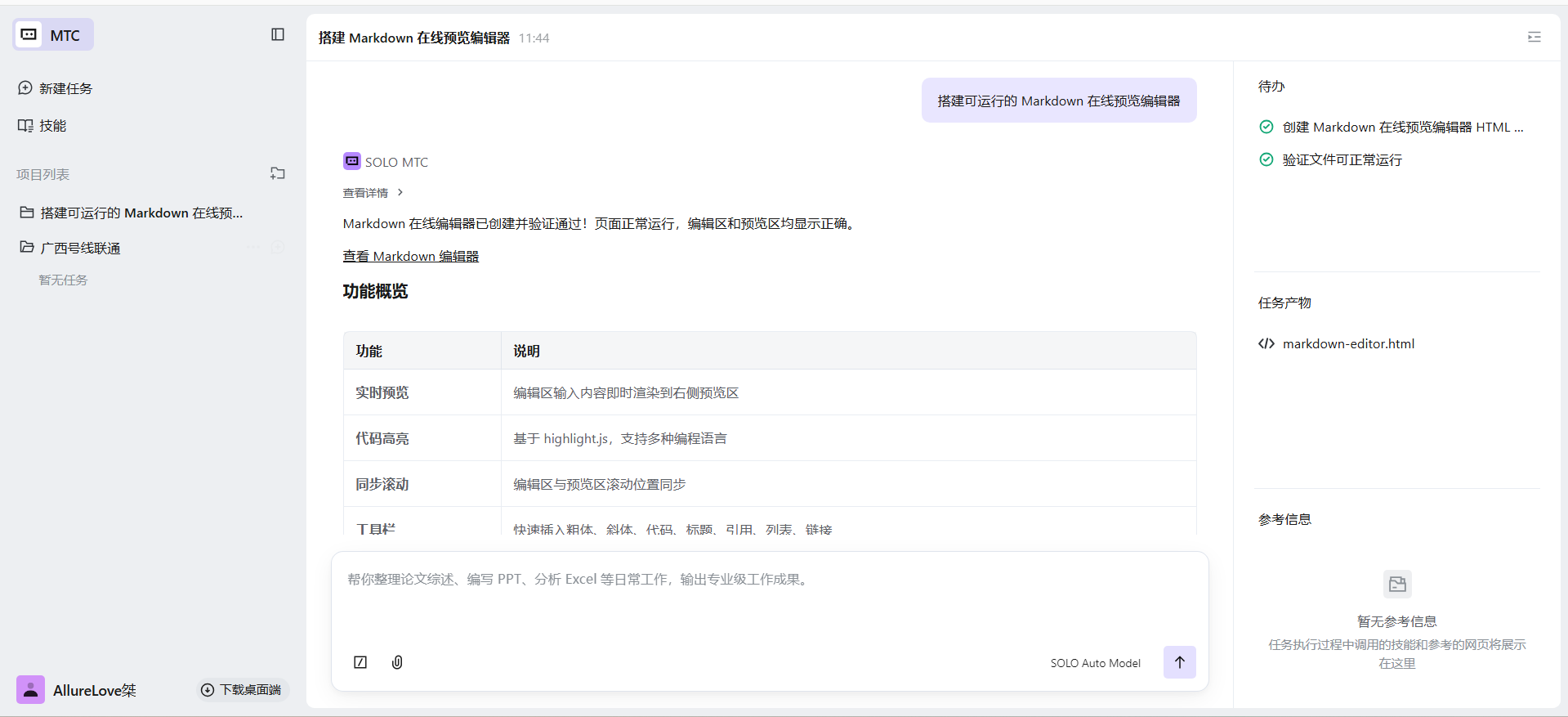
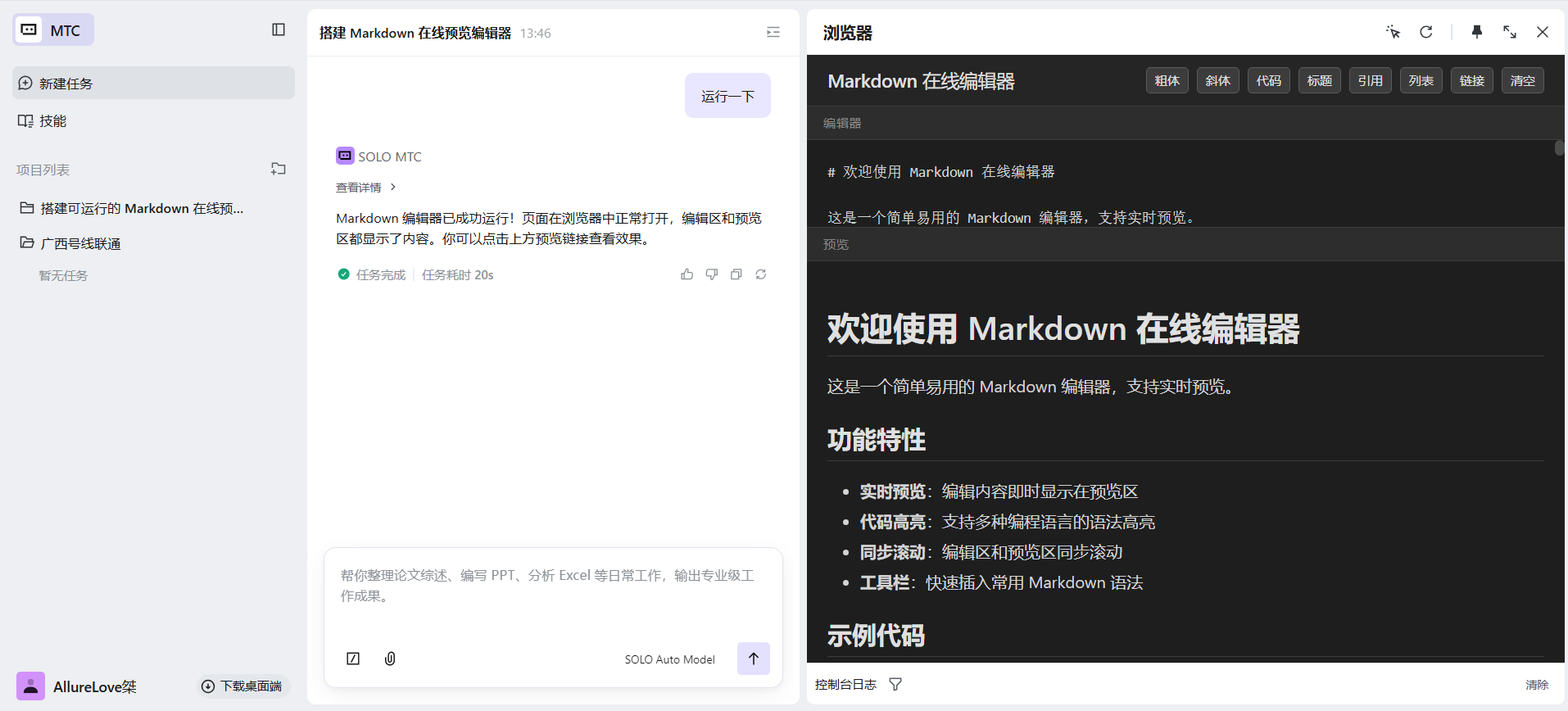
运行效果:
5.效果与总结
-
提效:传统开发需 1 小时,SOLO 仅8 分钟完成全功能 + 样式 + 调试
-
SOLO 价值:全程主导需求分析、技术选型、代码生成、Bug 修复,只需自然语言指挥
-
可复用方法:
-
用 SOLO 做纯前端工具时,明确 “无依赖、本地运行” 可大幅降低复杂度
-
复杂功能拆分为小模块,逐段让 SOLO 实现与调试
-
优先用 CDN 引入依赖(如 marked.js),保证单文件可运行
-