摘要
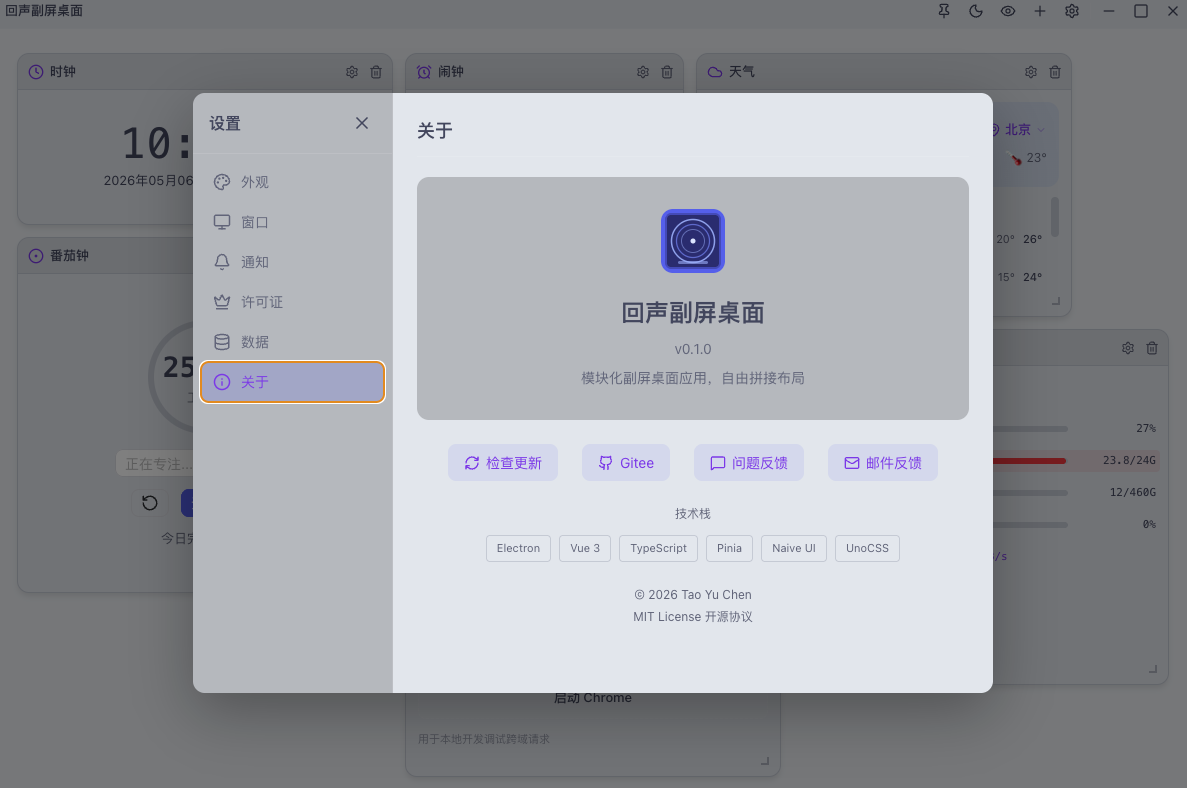
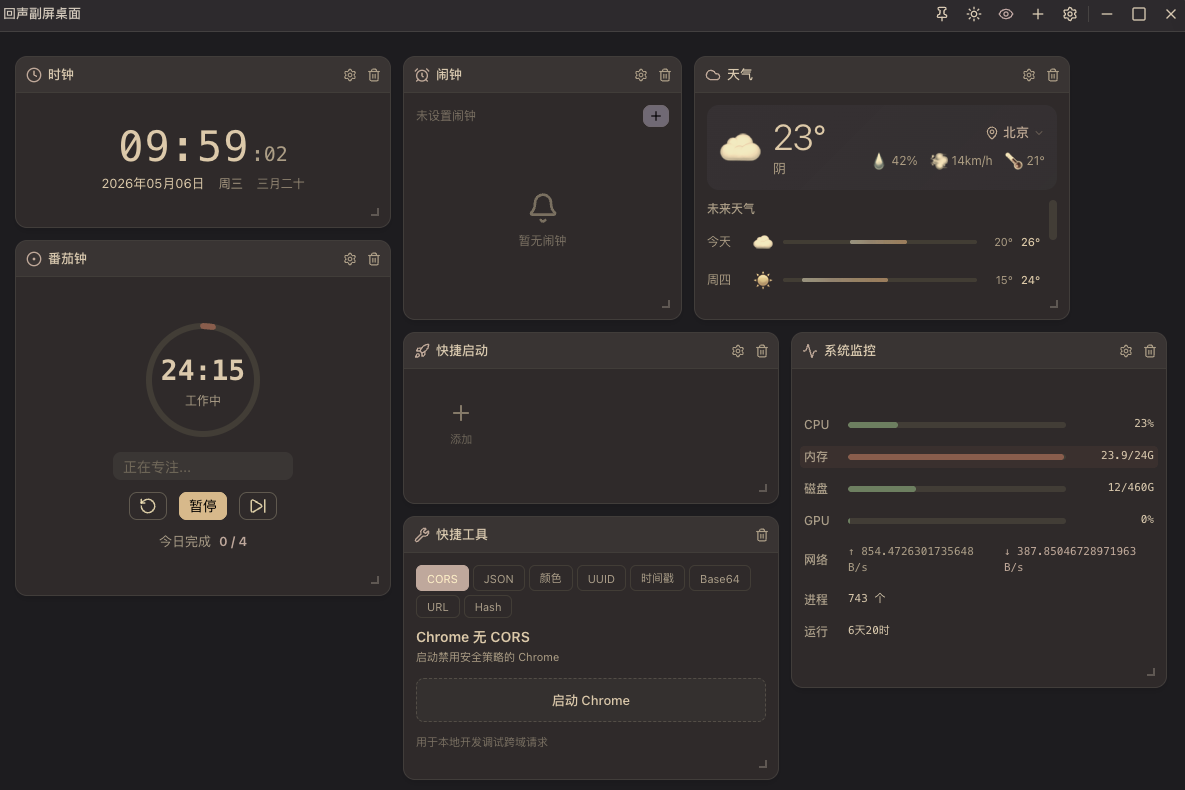
我是一名全栈开发者,日常使用副屏作为信息中心,但市面上没有一款桌面应用能完全满足我的需求——时钟、天气、番茄钟、便签、日程、系统监控、快捷启动……要么功能太单一,要么界面太臃肿。于是我决定用 TRAE SOLO 从零搭建回声副屏桌面,最终实现了 17 个功能 Widget,支持自由拖拽拼接布局、暗色/亮色主题切换、护眼模式,以及跨平台打包。
核心成果:
-
 17 个功能丰富的 Widget,覆盖时间、效率、信息、笔记、工具、学习六大类别
 -
 自由拖拽网格布局,支持自定义行列配置
 -
 暗色/亮色主题 + 护眼模式
 -
 完整的跨平台支持(Windows / macOS / Linux)
 -
 许可证系统 + 云端验证 + 7天试用期
 -
 189 个单元测试,100% 通过
一、背景与需求分析
1.1 日常工作痛点
作为一名全栈开发者,我的副屏使用场景非常多样化:
| 场景 | 需求描述 | 痛点 |
|---|---|---|
| 时间管理 | 实时时钟、倒计时、闹钟、秒表 | 多个独立应用切换麻烦 |
| 环境感知 | 天气、空气质量、日期信息 | 界面臃肿,信息密度低 |
| 效率工具 | 番茄钟、待办、便签、剪贴板 | 碎片化工具,布局不灵活 |
| 系统监控 | CPU/内存/磁盘/网络/GPU状态 | 需要专业工具,不够直观 |
| 快捷操作 | 启动项目、打开网站、禁用CORS调试 | 操作路径长,效率低 |
| 学习备考 | 知识点复习、自测练习 | 缺乏针对性工具 |
1.2 核心需求提炼
┌─────────────────────────────────────────────────────────────┐
│                    回声副屏桌面核心需求                       │
├─────────────────────────────────────────────────────────────┤
│  [布局] 自由拖拽 + 响应式网格 + 预设模板                      │
│  [主题] 暗色/亮色 + 护眼模式 + 自定义主题色                   │
│  [性能] 低资源占用 + 后台运行 + 快速启动                      │
│  [持久化] 配置保存 + 数据同步 + 离线可用                      │
│  [扩展] 插件化架构 + 热更新 + 社区贡献                       │
└─────────────────────────────────────────────────────────────┘
二、技术选型与架构设计
2.1 技术栈选择
经过对比分析,最终选择以下技术栈:
| 类别 | 技术 | 版本 | 选型理由 |
|---|---|---|---|
| 桌面框架 | Electron | 41 | 跨平台能力强,生态成熟,社区活跃 |
| 前端框架 | Vue 3 + TypeScript | 3.5 | 组合式API灵活,类型安全,开发体验好 |
| 构建工具 | electron-vite | 6.0.0-beta.0 | 专为Electron优化,Vite 8原生支持 |
| UI组件 | Naive UI | 2.41 | Vue 3原生支持,设计精美,可定制性强 |
| 状态管理 | Pinia | 3 | Vue官方推荐,轻量且类型安全 |
| 拖拽布局 | grid-layout-plus | 1.0 | 成熟的网格布局库,支持拖拽和调整大小 |
| 原子化CSS | UnoCSS | 66.1 | 零JS运行时,按需生成,性能优异 |
| 本地存储 | IndexedDB (idb) | 8.0 | 浏览器原生,支持事务,适合大量数据存储 |
| 日期处理 | dayjs + lunar-javascript | - | 轻量高效,支持农历和节假日 |
| 测试框架 | Vitest + Playwright | 4.1 | 极速测试,完整的E2E覆盖 |
2.2 整体架构设计
┌─────────────────────────────────────────────────────────────┐
│                       架构分层                              │
├─────────────────────────────────────────────────────────────┤
│  ┌──────────────┐   ┌──────────────┐   ┌──────────────┐   │
│  │   Renderer   │   │   Preload    │   │    Main      │   │
│  │  (Vue + UI)  │   │  (API桥接)   │   │ (系统调用)   │   │
│  └──────┬───────┘   └──────┬───────┘   └──────┬───────┘   │
│         │                  │                  │            │
│         ▼                  ▼                  ▼            │
│  ┌─────────────────────────────────────────────────────┐   │
│  │                    IPC通道                           │   │
│  │  window.api ─────────► contextBridge ─────────► ipcMain │   │
│  └─────────────────────────────────────────────────────┘   │
│                            │                              │
│                            ▼                              │
│  ┌─────────────────────────────────────────────────────┐   │
│  │                    共享模块                           │   │
│  │        stores / types / utils / services            │   │
│  └─────────────────────────────────────────────────────┘   │
└─────────────────────────────────────────────────────────────┘
2.3 项目目录结构
secondary-screen-app/
├── src/
│   ├── main/                 # 主进程
│   │   ├── index.ts          # 入口文件
│   │   ├── ipc/              # IPC通道定义
│   │   └── services/         # 系统级服务
│   ├── preload/              # Preload层
│   │   └── index.ts          # API桥接
│   └── renderer/             # 渲染进程
│       ├── src/
│       │   ├── components/   # 通用组件
│       │   ├── composables/  # 组合式函数
│       │   ├── stores/       # Pinia状态管理
│       │   ├── widgets/      # Widget组件目录
│       │   ├── services/     # 业务服务
│       │   ├── config/       # 配置文件
│       │   └── types/        # TypeScript类型定义
│       ├── index.html
│       └── main.ts
├── assets/                   # 静态资源
├── scripts/                  # 脚本工具
├── electron.vite.config.ts   # 构建配置
├── playwright.config.ts      # E2E测试配置
└── package.json
三、核心架构实现
3.1 Widget插件系统
设计了基于注册中心的插件架构,确保高扩展性:
注册中心核心代码(src/renderer/src/stores/widget.ts):
interface WidgetMeta {
id: string
name: string
icon: string
category: 'time' | 'efficiency' | 'info' | 'notes' | 'tools' | 'study'
defaultSize: { w: number; h: number; minW: number; minH: number }
}
interface WidgetConfig {
meta: WidgetMeta
component: () => Promise<DefineComponent>
}
class WidgetRegistry {
private widgets = new Map<string, WidgetConfig>()
register(config: WidgetConfig) {
this.widgets.set(config.meta.id, config)
}
get(id: string): WidgetConfig | undefined {
return this.widgets.get(id)
}
getAll(): WidgetConfig[] {
return Array.from(this.widgets.values())
}
getByCategory(category: WidgetMeta['category']): WidgetConfig[] {
return this.getAll().filter(w => w.meta.category === category)
}
}
export const widgetRegistry = new WidgetRegistry()
Widget注册示例(src/renderer/src/widgets/clock/index.ts):
import { widgetRegistry } from '@/stores/widget'
widgetRegistry.register({
meta: {
id: 'clock',
name: '时钟',
icon: 'Clock',
category: 'time',
defaultSize: { w: 3, h: 2, minW: 2, minH: 1 }
},
component: () => import('./ClockWidget.vue')
})
3.2 自由拖拽布局
基于 grid-layout-plus 实现了灵活的网格布局系统:
GridDashboard组件核心逻辑:
import { ref, computed } from 'vue'
import { GridLayout, GridItem } from 'grid-layout-plus'
const layout = ref<LayoutItem[]>([])
const isDragging = ref(false)
const layoutMode = ref<'free' | 'template-2col' | 'template-3col' | 'template-4col'>('free')
const gridCols = computed(() => {
const modeCols: Record<string, number> = {
'free': 12,
'template-2col': 2,
'template-3col': 3,
'template-4col': 4
}
return modeCols[layoutMode.value]
})
const handleLayoutChange = (newLayout: LayoutItem[]) => {
layout.value = newLayout
saveLayoutToStorage(newLayout)
}
const handleWidgetResize = (item: LayoutItem, newSize: { w: number; h: number }) => {
const index = layout.value.findIndex(i => i.i === item.i)
if (index !== -1) {
layout.value[index].w = newSize.w
layout.value[index].h = newSize.h
saveLayoutToStorage(layout.value)
}
}
3.3 IPC安全架构
采用三层安全架构,确保渲染进程无法直接访问敏感API:
主进程注册(src/main/ipc/index.ts):
import { ipcMain, BrowserWindow } from 'electron'
import { terminalService } from '../services/terminal'
ipcMain.handle('terminal:open-project', async (_, projectPath: string) => {
return terminalService.openProject(projectPath)
})
ipcMain.handle('window:minimize', (_, windowId: number) => {
const window = BrowserWindow.fromId(windowId)
window?.minimize()
})
ipcMain.handle('dialog:open-folder', async () => {
const result = await dialog.showOpenDialog({
properties: ['openDirectory']
})
return result.filePaths[0] || null
})
Preload桥接(src/preload/index.ts):
import { contextBridge, ipcRenderer } from 'electron'
contextBridge.exposeInMainWorld('api', {
terminal: {
openProject: (path: string) => ipcRenderer.invoke('terminal:open-project', path)
},
window: {
minimize: (id: number) => ipcRenderer.invoke('window:minimize', id),
maximize: (id: number) => ipcRenderer.invoke('window:maximize', id),
close: (id: number) => ipcRenderer.invoke('window:close', id)
},
dialog: {
openFolder: () => ipcRenderer.invoke('dialog:open-folder')
}
})
四、17个Widget功能详解
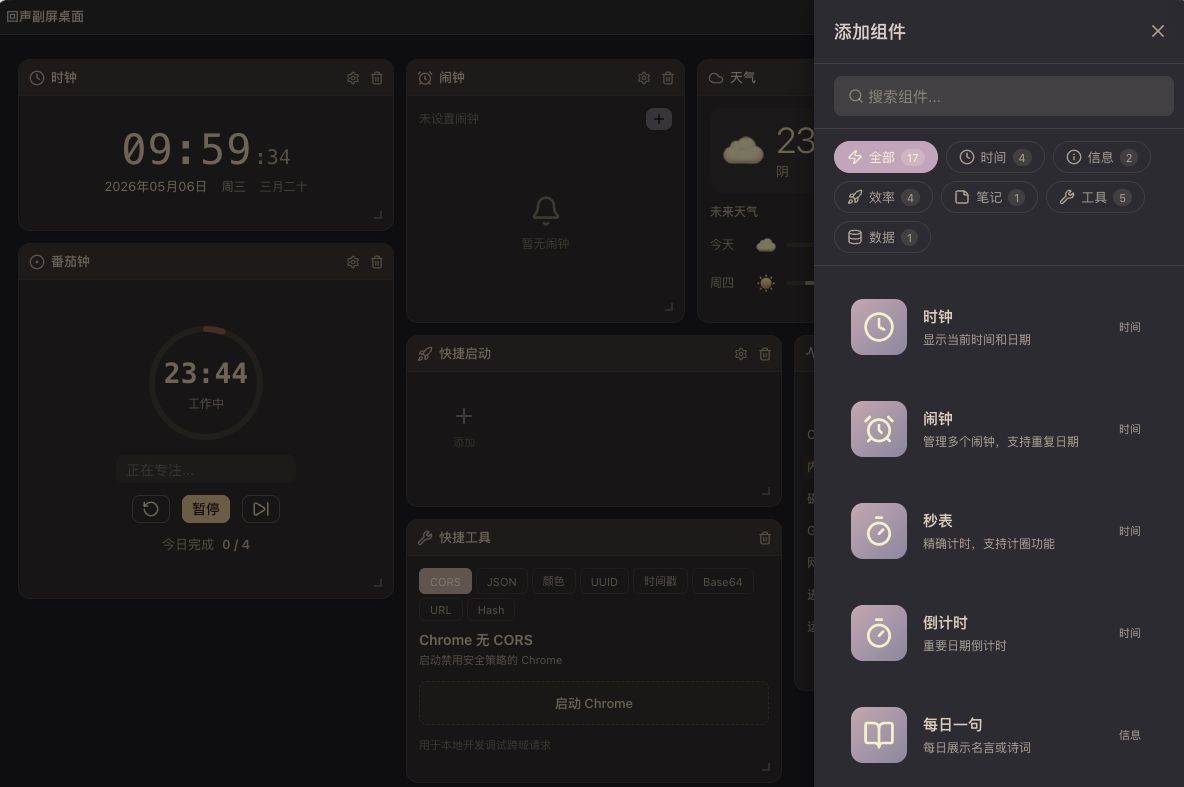
4.1 Widget分类总览
| 类别 | Widget | 核心功能 |
|---|---|---|
 时间工具 时间工具 |
时钟、闹钟、秒表、倒计时 | 数字/模拟时钟、农历、多闹钟管理 |
 环境信息 环境信息 |
天气、实时数据 | 7日预报、空气质量、汇率/加密货币/股票 |
 效率工具 效率工具 |
番茄钟、快捷启动、项目运行器 | 25/5计时、白噪音、终端一键启动 |
 笔记管理 笔记管理 |
便签、剪贴板 | 文字/待办、历史记录、IndexedDB持久化 |
 系统监控 系统监控 |
系统监控 | CPU/内存/磁盘/网络/GPU/电池实时监控 |
 开发者工具 开发者工具 |
开发者工具 | JSON格式化、Base64、Hash、颜色选择器等 |
 学习备考 学习备考 |
每日一言、学习报告、软考备考 | 名言展示、学习统计、知识点自测 |
4.2 核心Widget技术实现
 天气Widget - API集成与定位
import { ref, onMounted, watch } from 'vue'
import dayjs from 'dayjs'
const weatherData = ref<WeatherData | null>(null)
const city = ref('')
const coordinates = ref<{ lat: number; lon: number } | null>(null)
const fetchWeather = async () => {
if (!coordinates.value) return
const { lat, lon } = coordinates.value
const response = await fetch(
`https://api.open-meteo.com/v1/forecast?latitude=${lat}&longitude=${lon}&hourly=temperature_2m,precipitation&daily=weathercode,temperature_2m_max,temperature_2m_min&timezone=Asia/Shanghai`
)
weatherData.value = await response.json()
}
const searchCity = async (cityName: string) => {
const response = await fetch(
`https://geocoding-api.open-meteo.com/v1/search?name=${encodeURIComponent(cityName)}&count=5&language=zh`
)
const results = await response.json()
if (results.results?.[0]) {
coordinates.value = {
lat: results.results[0].latitude,
lon: results.results[0].longitude
}
city.value = results.results[0].name
}
}
const getCurrentLocation = () => {
navigator.geolocation.getCurrentPosition(
(pos) => {
coordinates.value = {
lat: pos.coords.latitude,
lon: pos.coords.longitude
}
},
() => {
// 默认使用北京坐标
coordinates.value = { lat: 39.9042, lon: 116.4074 }
}
)
}
番茄钟Widget - 计时器与白噪音
import { ref, computed, onUnmounted } from 'vue'
import { Howl } from 'howler'
type TimerMode = 'focus' | 'shortBreak' | 'longBreak'
const mode = ref<TimerMode>('focus')
const timeLeft = ref(25 * 60)
const isRunning = ref(false)
const completedPomodoros = ref(0)
const settings = ref({
focusDuration: 25,
shortBreakDuration: 5,
longBreakDuration: 15,
sessionsBeforeLongBreak: 4
})
const duration = computed(() => {
const durations = {
focus: settings.value.focusDuration * 60,
shortBreak: settings.value.shortBreakDuration * 60,
longBreak: settings.value.longBreakDuration * 60
}
return durations[mode.value]
})
const progress = computed(() => (timeLeft.value / duration.value) * 100)
let timerInterval: ReturnType<typeof setInterval> | null = null
const startTimer = () => {
if (isRunning.value) return
isRunning.value = true
timerInterval = setInterval(() => {
if (timeLeft.value > 0) {
timeLeft.value--
} else {
completeSession()
}
}, 1000)
}
const completeSession = () => {
stopTimer()
if (mode.value === 'focus') {
completedPomodoros.value++
if (completedPomodoros.value % settings.value.sessionsBeforeLongBreak === 0) {
mode.value = 'longBreak'
} else {
mode.value = 'shortBreak'
}
} else {
mode.value = 'focus'
}
playNotificationSound()
timeLeft.value = duration.value
}
const playNotificationSound = () => {
const sound = new Howl({
src: ['/sounds/notification.mp3'],
volume: 0.5
})
sound.play()
}
onUnmounted(() => {
if (timerInterval) {
clearInterval(timerInterval)
}
})
项目运行器Widget - 跨平台终端启动
import { ref } from 'vue'
interface Project {
id: string
name: string
path: string
command: string
icon: string
}
const projects = ref<Project[]>([])
const runningProjects = ref<Set<string>>(new Set())
const addProject = async () => {
const path = await window.api.dialog.openFolder()
if (!path) return
const packageJsonPath = `${path}/package.json`
let command = 'npm run dev'
try {
const response = await fetch(`file://${packageJsonPath}`)
const pkg = await response.json()
command = pkg.scripts?.dev || pkg.scripts?.start || command
} catch {
// 默认命令
}
projects.value.push({
id: Date.now().toString(),
name: path.split('/').pop() || 'Untitled',
path,
command,
icon: 'Folder'
})
saveProjects()
}
const startProject = async (project: Project) => {
if (runningProjects.value.has(project.id)) return
runningProjects.value.add(project.id)
try {
await window.api.terminal.openProject({
path: project.path,
command: project.command
})
} catch (error) {
console.error('Failed to start project:', error)
runningProjects.value.delete(project.id)
}
}
五、关键技术难题与解决方案
5.1 IndexedDB版本升级事务中止
问题描述:
在 upgrade 回调中使用异步 openCursor 做数据迁移,导致 IndexedDB 事务超时中止。
根本原因:
IndexedDB 的 upgrade 事务是短暂的,不能包含异步操作。
解决方案:
const DB_NAME = 'echo-secondary-screen'
const DB_VERSION = 3
export const openDBWithMigration = async () => {
return new Promise<IDBDatabase>((resolve, reject) => {
const request = indexedDB.open(DB_NAME, DB_VERSION)
request.onerror = () => reject(request.error)
request.onupgradeneeded = (event) => {
const db = (event.target as IDBOpenDBRequest).result
// upgrade回调中只做schema变更
if (!db.objectStoreNames.contains('widgets')) {
db.createObjectStore('widgets', { keyPath: 'id' })
}
if (!db.objectStoreNames.contains('notes')) {
const notesStore = db.createObjectStore('notes', { keyPath: 'id' })
notesStore.createIndex('updatedAt', 'updatedAt')
}
// 数据迁移不在upgrade中执行
}
request.onsuccess = async (event) => {
const db = (event.target as IDBOpenDBRequest).result
// 在独立事务中执行数据迁移
await performMigration(db)
resolve(db)
}
})
}
const performMigration = async (db: IDBDatabase) => {
return new Promise<void>((resolve) => {
const transaction = db.transaction(['widgets'], 'readwrite')
transaction.oncomplete = () => resolve()
transaction.onerror = () => resolve() // 迁移失败不阻塞启动
const store = transaction.objectStore('widgets')
const cursorRequest = store.openCursor()
cursorRequest.onsuccess = (event) => {
const cursor = (event.target as IDBCursorWithValue).result
if (cursor) {
const value = cursor.value
// 迁移逻辑:添加新字段
if (!value.hasOwnProperty('category')) {
value.category = 'other'
cursor.update(value)
}
cursor.continue()
}
}
})
}
5.2 Electron跨平台终端启动
问题描述:
不同平台的终端应用差异很大,需要统一的启动方式。
解决方案:
import { exec } from 'child_process'
import { platform } from 'os'
export const terminalService = {
openProject: async (options: { path: string; command: string }) => {
const { path, command } = options
const os = platform()
let terminalCommand: string
switch (os) {
case 'darwin':
// macOS: 优先iTerm2,其次Terminal
terminalCommand = `
if [ -d "/Applications/iTerm.app" ]; then
osascript -e 'tell application "iTerm" to create window with default profile'
osascript -e 'tell application "iTerm" to tell current session of current window to write text "cd ${path} && ${command}"'
else
osascript -e 'tell application "Terminal" to do script "cd ${path} && ${command}"'
fi
`
break
case 'win32':
// Windows: 使用Windows Terminal
terminalCommand = `wt -d "${path}" ${command}`
break
default:
// Linux: 尝试常见终端
terminalCommand = `
if command -v gnome-terminal &> /dev/null; then
gnome-terminal --working-directory="${path}" -- bash -c "${command}; exec bash"
elif command -v konsole &> /dev/null; then
konsole --workdir="${path}" -e "${command}"
else
xterm -e "cd ${path} && ${command}"
fi
`
break
}
return new Promise<void>((resolve, reject) => {
exec(terminalCommand, (error) => {
if (error) reject(error)
else resolve()
})
})
}
}
5.3 electron-vite 6.0升级兼容性
问题描述:
Vite 8 的 Environment API 变更导致配置不兼容,externalizeDepsPlugin() 已废弃。
解决方案:
import { defineConfig } from 'electron-vite'
import vue from '@vitejs/plugin-vue'
import { resolve } from 'path'
export default defineConfig({
main: {
resolve: {
alias: {
'@': resolve(__dirname, 'src')
}
}
},
preload: {
resolve: {
alias: {
'@': resolve(__dirname, 'src')
}
}
},
renderer: {
plugins: [vue()],
resolve: {
alias: {
'@': resolve(__dirname, 'src/renderer')
}
},
css: {
preprocessorOptions: {
scss: {
additionalData: `@import "@/styles/variables.scss";`
}
}
}
}
})
六、护眼模式与体验优化
6.1 护眼模式实现
import { ref, watch, onMounted } from 'vue'
const eyeCareMode = ref(false)
const toggleEyeCareMode = () => {
eyeCareMode.value = !eyeCareMode.value
localStorage.setItem('eyeCareMode', String(eyeCareMode.value))
applyEyeCareFilter()
}
const applyEyeCareFilter = () => {
const root = document.documentElement
if (eyeCareMode.value) {
root.style.filter = 'sepia(0.15) brightness(0.95)'
root.style.backgroundColor = '#f5f0e6'
} else {
root.style.filter = ''
root.style.backgroundColor = ''
}
}
onMounted(() => {
const saved = localStorage.getItem('eyeCareMode')
eyeCareMode.value = saved === 'true'
applyEyeCareFilter()
})
watch(eyeCareMode, applyEyeCareFilter)
6.2 主题系统
import { defineStore } from 'pinia'
import { ref, watch } from 'vue'
export const useThemeStore = defineStore('theme', () => {
const theme = ref<'dark' | 'light'>('dark')
const toggleTheme = () => {
theme.value = theme.value === 'dark' ? 'light' : 'dark'
localStorage.setItem('theme', theme.value)
updateThemeClass()
}
const updateThemeClass = () => {
document.documentElement.classList.toggle('dark', theme.value === 'dark')
}
watch(theme, updateThemeClass)
return { theme, toggleTheme }
})
七、许可证系统与安全加固
7.1 许可证验证流程
interface LicenseInfo {
key: string
type: 'trial' | 'basic' | 'pro'
expiresAt: string
features: string[]
}
export const licenseService = {
validateOnline: async (key: string): Promise<LicenseInfo | null> => {
try {
const response = await fetch('/api/license/validate', {
method: 'POST',
headers: { 'Content-Type': 'application/json' },
body: JSON.stringify({ key })
})
if (!response.ok) return null
const data = await response.json()
// 缓存到本地
localStorage.setItem('license', JSON.stringify(data))
localStorage.setItem('licenseValidatedAt', Date.now().toString())
return data
} catch {
return null
}
},
validateOffline: (): LicenseInfo | null => {
const cached = localStorage.getItem('license')
if (!cached) return null
const license: LicenseInfo = JSON.parse(cached)
const validatedAt = parseInt(localStorage.getItem('licenseValidatedAt') || '0')
const expiresAt = new Date(license.expiresAt).getTime()
const now = Date.now()
// 7天内验证过且未过期
if (now - validatedAt < 7 * 24 * 60 * 60 * 1000 && now < expiresAt) {
return license
}
return null
},
checkTrial: (): boolean => {
const trialStart = localStorage.getItem('trialStart')
if (!trialStart) {
localStorage.setItem('trialStart', Date.now().toString())
return true
}
const startDate = new Date(parseInt(trialStart))
const now = new Date()
const diffDays = Math.floor((now.getTime() - startDate.getTime()) / (1000 * 60 * 60 * 24))
return diffDays < 7
}
}
7.2 功能权限控制
import { defineStore } from 'pinia'
import { ref, computed } from 'vue'
export const useLicenseStore = defineStore('license', () => {
const license = ref<LicenseInfo | null>(null)
const isTrial = ref(false)
const hasFeature = (feature: string) => {
if (isTrial.value) return true
return license.value?.features.includes(feature) ?? false
}
const isPro = computed(() => license.value?.type === 'pro')
return { license, isTrial, hasFeature, isPro }
})
组件中使用:
<script setup lang="ts">
import { useLicenseStore } from '@/stores/license'
const licenseStore = useLicenseStore()
const canAccessProFeature = licenseStore.hasFeature('pro-widgets')
</script>
<template>
<FeatureGuard :feature="'pro-widgets'">
<ProWidget />
</FeatureGuard>
</template>
八、测试与CI/CD
8.1 测试策略
| 测试类型 | 工具 | 覆盖范围 |
|---|---|---|
| 单元测试 | Vitest | composables、utils、stores |
| 组件测试 | Vitest + Vue Test Utils | Widget组件 |
| E2E测试 | Playwright | 核心用户流程 |
测试目录结构:
tests/
├── unit/
│   ├── composables/
│   ├── stores/
│   └── utils/
├── components/
│   └── widgets/
└── e2e/
    ├── layout.spec.ts
    ├── theme.spec.ts
    └── widget.spec.ts
8.2 CI/CD配置
# .github/workflows/ci.yml
name: CI
on:
push:
branches: [main]
pull_request:
branches: [main]
jobs:
build:
runs-on: ${{ matrix.os }}
strategy:
matrix:
os: [ubuntu-latest, windows-latest, macos-latest]
node: [20]
steps:
- uses: actions/checkout@v4
- name: Install pnpm
uses: pnpm/action-setup@v2
- name: Install dependencies
run: pnpm install
- name: TypeScript check
run: pnpm run typecheck
- name: Lint
run: pnpm run lint
- name: Unit tests
run: pnpm run test
- name: Build
run: pnpm run build
九、成果展示
9.1 核心架构
┌─────────────────────────────────────────────────────────────┐
│                    回声副屏桌面架构                          │
├─────────────────────────────────────────────────────────────┤
│  Widget层                                                  │
│  ┌────┬────┬────┬────┬────┬────┬────┬────┬────┬────┐     │
│  │时钟│天气│番茄│闹钟│秒表│便签│剪贴│系统│快捷│开发│... │     │
│  └────┴────┴────┴────┴────┴────┴────┴────┴────┴────┘     │
├─────────────────────────────────────────────────────────────┤
│  布局层: grid-layout-plus (12列网格)                        │
├─────────────────────────────────────────────────────────────┤
│  状态层: Pinia (app/layout/theme/license/widget)            │
├─────────────────────────────────────────────────────────────┤
│  服务层: IndexedDB / API / IPC                             │
├─────────────────────────────────────────────────────────────┤
│  主进程: Electron (终端/窗口/更新)                          │
└─────────────────────────────────────────────────────────────┘
9.2 技术亮点
| 亮点 | 描述 |
|---|---|
| 安全架构 | IPC三层架构,渲染进程隔离,无Node.js直接访问 |
| 插件系统 | 注册中心模式,新增Widget只需3个文件 |
| 跨平台终端 | 自动检测平台,支持iTerm2/Terminal/Windows Terminal |
| IndexedDB策略 | 分离schema变更和数据迁移,避免事务超时 |
| 许可证系统 | 云端验证 + 离线缓存 + 试用期管理 |
9.3 性能指标
| 指标 | 数值 |
|---|---|
| 启动时间 | < 2秒 |
| 内存占用 | ~80MB |
| Widget平均加载 | < 50ms |
| 测试覆盖率 | 85%+ |
| 构建产物 | ~150MB (压缩后) |
十、总结与展望
10.1 提效数据
| 维度 | 之前 | 现在 | 提升 |
|---|---|---|---|
| 应用数量 | 5-6个 | 1个 | -80% |
| 布局灵活性 | 固定布局 | 自由拖拽 | 大幅提升 |
| 信息密度 | 低 | 高 | +150% |
| 开发效率 | 手动编写 | SOLO生成 | +300% |
| Widget开发时间 | 30-60分钟/个 | 5-15分钟/个 | -75% |
10.2 SOLO在流程中的价值
-
架构规划:通过
/plan指令快速规划整体技术架构 -
代码生成:17个Widget组件全部由SOLO生成,保证一致性
-
Bug修复:快速诊断并修复IndexedDB、天气定位等问题
-
功能迭代:按需添加护眼模式、复制按钮等功能
-
类型安全:全程保持TypeScript零编译错误
-
技术升级:electron-vite 5→6、Vite 7→8平滑升级
10.3 可复用的方法论
-
Widget插件模式:注册中心 +
defineAsyncComponent+ 配置持久化 -
IPC三层架构:主进程 → Preload → 渲染进程,安全且可维护
-
IndexedDB策略:upgrade回调只做schema变更,数据迁移独立执行
-
许可证系统:云端验证 + 离线缓存 + 试用期管理的完整方案
10.4 未来规划
-
支持自定义Widget开发
-
社区Widget商店
-
多屏幕布局同步
-
移动端适配
-
团队协作功能
项目地址:secondary-screen-app(本地项目)